Michael Pace

Creating AI-built tools for everyday people.

If I have an idea, I open Claude Code and start building it. With Claude and OpenAI's Codex I've built a client app that handles health information, tools for my hospital IT job, and custom development tools for the Unity engine. Along the way I built my own setup: agents working side by side, skills I wrote for them, and tests that check what they produce.

How I build with AI

Agents write most of the code. I decide what gets built, write the rules they follow, and review the work before it lands.

The pipeline

  1. Project setup

    Before any code, I write unique instructional files (.md) that agents read first: rules, project layout and tests to run.

  2. Code agent

    Claude Code asks clarifying questions first, then builds each feature in the real codebase, following those files.

  3. Checks

    The agent tests its own work and shows that the change does what was asked.

  4. My review

    I approve it or send it back. Nothing destructive runs without my sign-off.

Built with
  • Claude Code
  • OpenAI Codex
  • Claude Design
  • MCP
  • Custom agent skills
  • CLAUDE.md / AGENTS.md instruction files

Studio companion app

A two-sided app for a local Pilates and fitness business. Clients use it on their phone to fill in their health form, book visits, follow the home program their trainer set, and ask questions about classes and prices. Staff get a dashboard with each client's record, an AI summary of the health form, session notes, and messages from the studio's website. It goes live in November 2026.

Staff dashboard
Staff dashboard showing an AI summary of a client's health form. Two flags are listed, and the sentences they came from are highlighted in the form beside it.
The AI's summary sits beside the client's own form, with the sentences behind each flag highlighted. Every person and health detail on screen is made up.
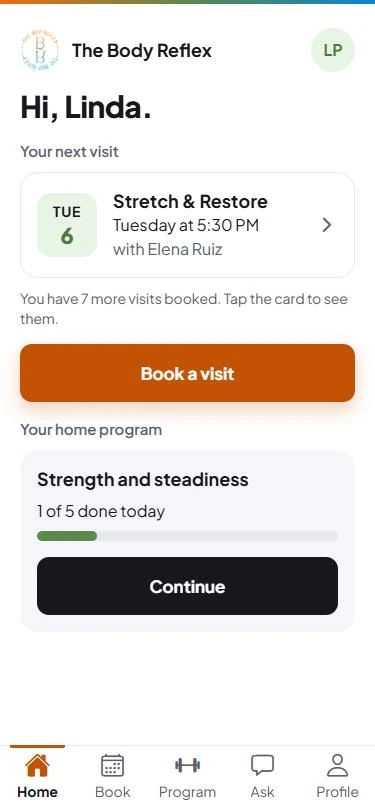
Client app home screen: the next visit, a Book a visit button, and the home program with a progress bar.
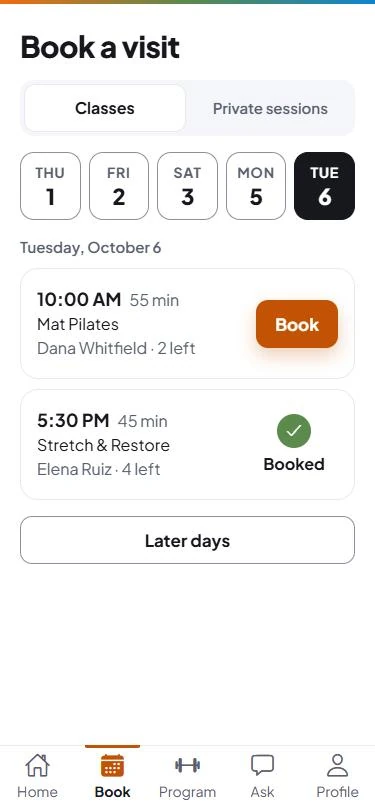
Client app booking screen: day buttons, a class with a Book button and a class marked Booked.
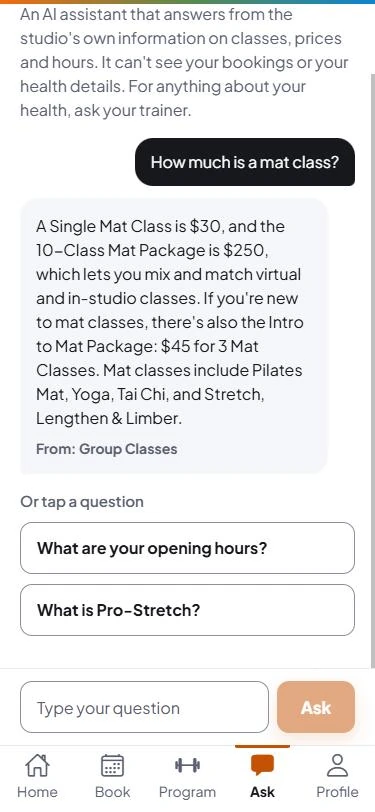
Client app Ask the studio screen answering a question about class prices and naming the page the answer came from.
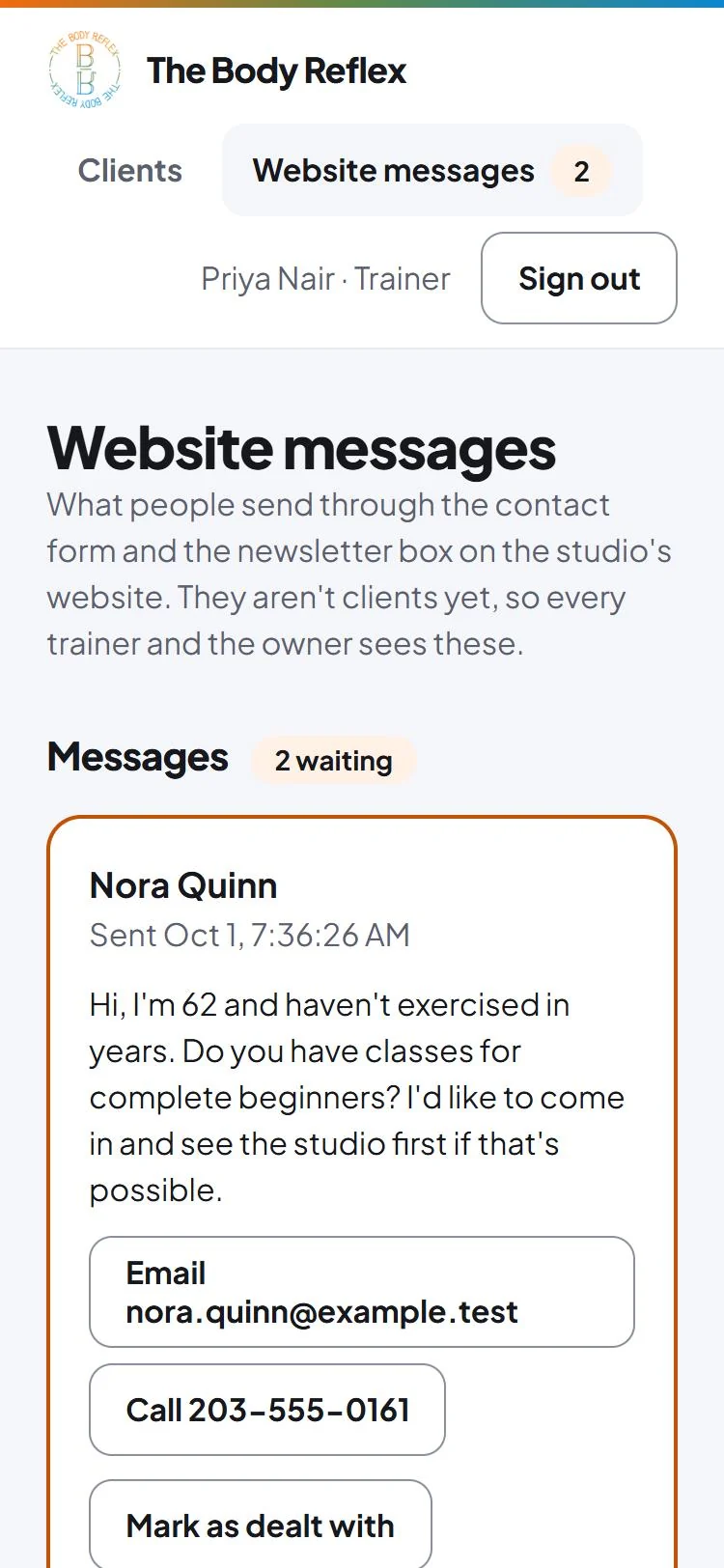
The staff dashboard on a phone, on its Website messages page: two messages waiting, the first from someone asking about beginner classes, with buttons to email, call or mark it as dealt with.
The client app: home, booking, and the Ask the studio assistant answering a price question from the studio's own content. Last, the staff side: messages sent through the studio's website. Every name and message is made up.

How it works

  • The assistant answers routine questions, with the source.

    Clients ask about classes, prices and hours. The assistant answers only from the studio's own published content and names the page the answer came from.

  • It knows when to hand over to a person.

    Health questions are declined, with an offer to pass the question to the client's trainer.

  • Website enquiries land where staff already look.

    Contact-form messages and newsletter sign-ups from the studio's website show up on one page for every trainer and the owner.
How it's built

  • One codebase, two apps.

    A single repository holds the client app (Expo and React Native), the staff dashboard (Next.js) and shared TypeScript packages for types, helpers and the AI code. The backend is Supabase, which is PostgreSQL with sign-in built in.

  • The AI runs on the server, never on the phone.

    Both AI features call the Claude API from the studio's server. The phone never holds the key, and the server checks who is signed in and a daily allowance before the model is called.

  • Every push is checked.

    GitHub Actions runs type checks, lint, unit tests and the database tests on every push.

Built with
  • Expo / React Native
  • Next.js
  • TypeScript
  • Supabase (PostgreSQL)
  • Row-level security
  • pgTAP
  • Vitest
  • Claude API
  • GitHub Actions
  • Playwright

Built for sensitive data

The studio app holds health forms, so the protections are built into the database, not left to the screens.

  • The database decides who sees what.

    Row-level security is on for all 18 tables, so a bug in either app can't widen access. 179 database tests back it up, including ones that sign in as the wrong person and check that the read is refused.

  • Every look at a health record is written down.

    Health forms are encrypted. The only way to read one also writes an audit record, including for refused attempts, and only the owner can see that log.

  • The AI never learns who the client is.

    A database function decides what the AI receives: health answers with an age in place of the birth date, no name, and nothing at all without the client's consent. Withdrawing consent deletes what the AI wrote.

  • AI output is checked by code before anyone sees it.

    Each flag in a health summary must quote the client's own words, or the server drops it. The Ask the studio assistant answers only from the studio's content, and a price that isn't on the price list never reaches the client.

  • Built on made-up data.

    Every client and health detail used to build and test it is invented. No real client's information has been near it.

Measured, not assumed

Each AI feature has its own test set.

60 / 60
Health summary

Every expected health flag was caught across 48 runs, and no healthy client was flagged.

80 / 80
Ask the studio

Every answer passed (30 Sep 2026). I read a perfect score as the test being too easy, so harder questions are next.

I checked each answer key by hand before trusting a score. A trainer's review is the next step.

Client website

The same studio's website. I moved its booking links to a new system on the live site, then rebuilt the whole site so the owner can edit it herself. The rebuilt site goes live in November 2026.

Before · Squarespace
The studio's old Squarespace homepage: a small photo banner, long paragraphs of text and a second photo.
After · rebuilt
The rebuilt homepage: a full-width studio photo, the headline Changing lives through movement, and one button to book a free visit.

What I did

  • Moved the live site to a new booking system.

    When the studio changed booking systems, I moved every booking, class-package and gift card link on the existing site and checked all 25 public pages by script.

  • Rebuilt it so the owner can edit it.

    Built with Astro and TinaCMS. The owner can click the text on a page, type and save, and each save is a commit that redeploys the site.

  • Kept every old address working.

    I saved a full copy of the Squarespace site first, then mapped 16 redirects so each old address lands on a working page. The leftover template pages and a duplicate homepage are gone.

  • Chose the host on cost.

    Every save in the editor is a deploy, which would have used up another host's free plan. The site runs on Cloudflare.

Built with
  • Astro
  • TinaCMS
  • Cloudflare Workers
  • GitHub
  • Python
  • Playwright

Bringing AI into my day job

Smaller tools I built between tickets to help with day-to-day tasks.
Device scanner

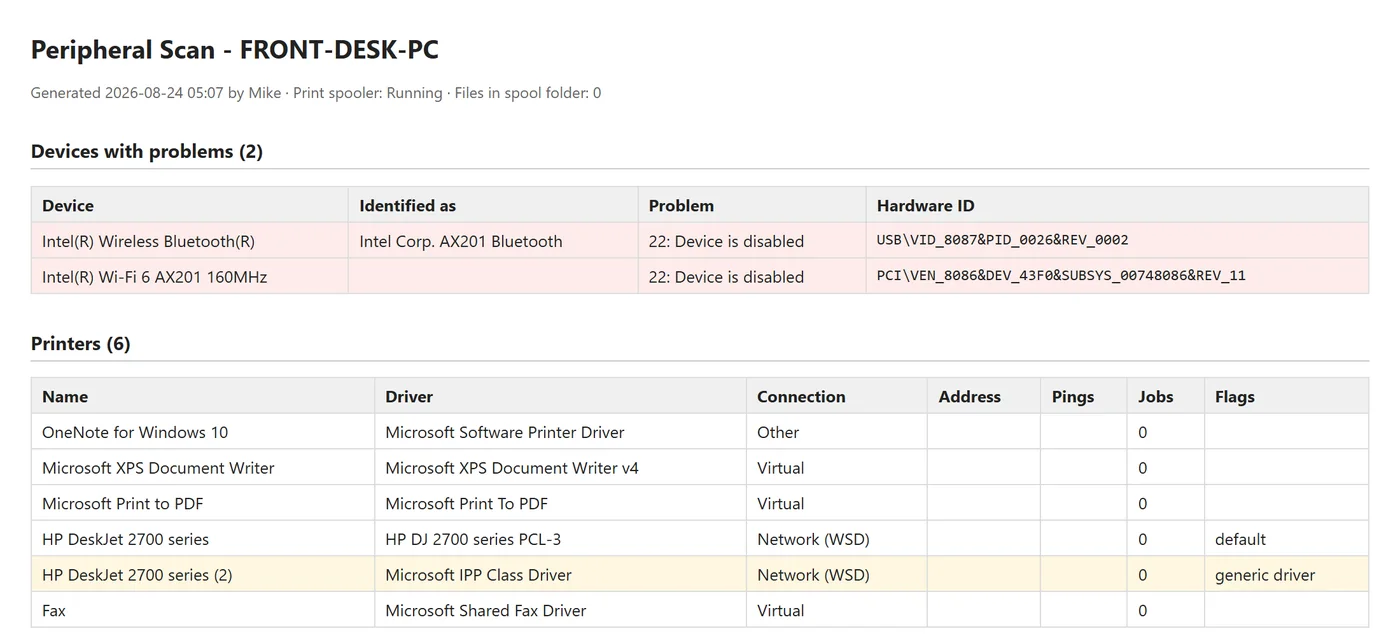
Scan report
A report titled Peripheral Scan, listing two devices with problems and six printers, one flagged for using a generic driver.
A scan report ready to attach to a support ticket. It comes from a test on my home PC, with the PC name replaced.
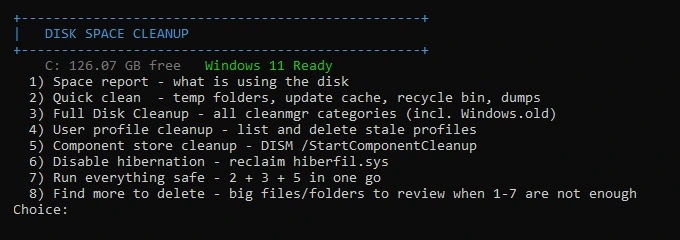
  • Disk Space Cleanup

    Low-storage tickets kept coming up, each with the same manual steps. This tool runs them in order, protects logged-in users and shared clinical accounts, and logs the space freed per item for the ticket notes. I use it at work.

    Command PromptThe Disk Space Cleanup menu in a command window: free space on C:, then eight numbered options from a space report to a full cleanup.
  • Driver Search & Install

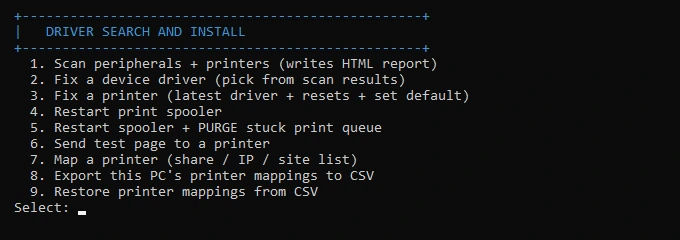
    It scans a PC's devices, explains each problem in plain English, works through seven fixes while asking before each change, and writes a report for the ticket. Built and tested at home; not yet used on hospital PCs.

    Command PromptThe Driver Search and Install menu in a command window: nine numbered options, including scanning devices and printers, fixing a driver and mapping a printer.

Hospital Wayfinder

Hospitals are confusing to get around, and ours had no floor map that was easy to pull up. I built a tool that takes the partial floor maps from AeroScout and stitches them into searchable maps with directions. I used it daily in my first weeks while learning the buildings.
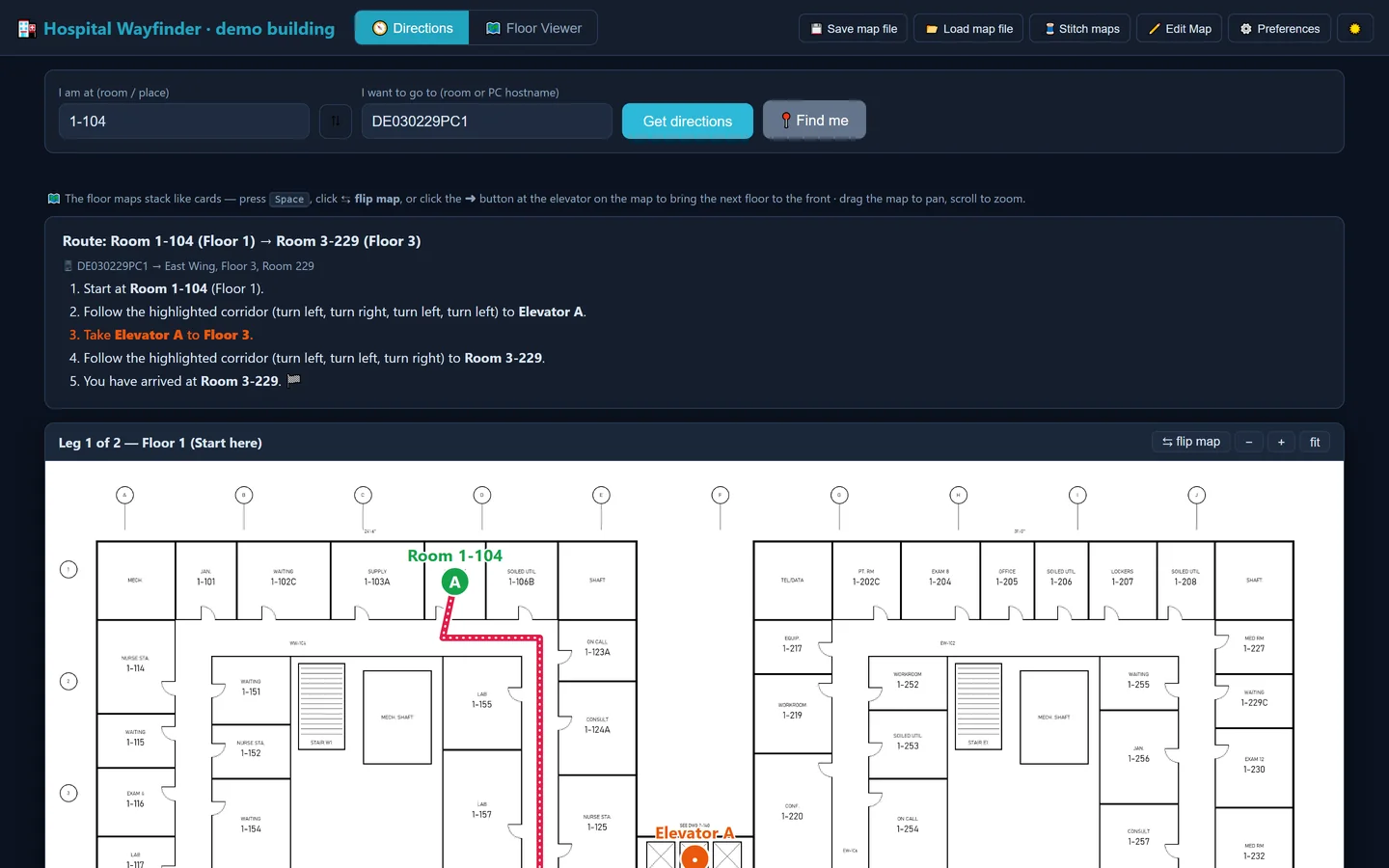
Hospital Wayfinder
A wayfinding tool showing a route from Room 1-104 on Floor 1 to Room 3-229 on Floor 3, with five written steps and a floor plan with the route drawn to an elevator.
A route across two floors, with the destination typed as a PC's name. This is the real tool running on a made-up building; the hospital's floor plans and naming scheme stay private.

What it does

No patient data involved.

  • Type a room, get a route.

    Enter a room number or a PC's name and it gives step-by-step directions across floors, including which elevator to take.

  • It reads the room numbers itself.

    The tool reads the labels off the drawings instead of someone typing them in, about 2,500 so far, and ignores drawing codes and measurements.

  • It says when it's estimating.

    If a room isn't on the map yet, it routes to the nearest numbered room and says so.

  • Nothing to install.

    It runs as a single file on locked-down hospital PCs. Every floor is mapped and labelled. Routes work where corridors have been traced, which is only part of the campus so far.

Built with
  • PowerShell
  • WMI / CIM
  • DISM
  • JavaScript
  • Tesseract OCR
  • Python (NumPy)

Off-the-clock development

Outside work I use AI to help me create games in the Unity engine, from timed game jam entries to a full Steam release.
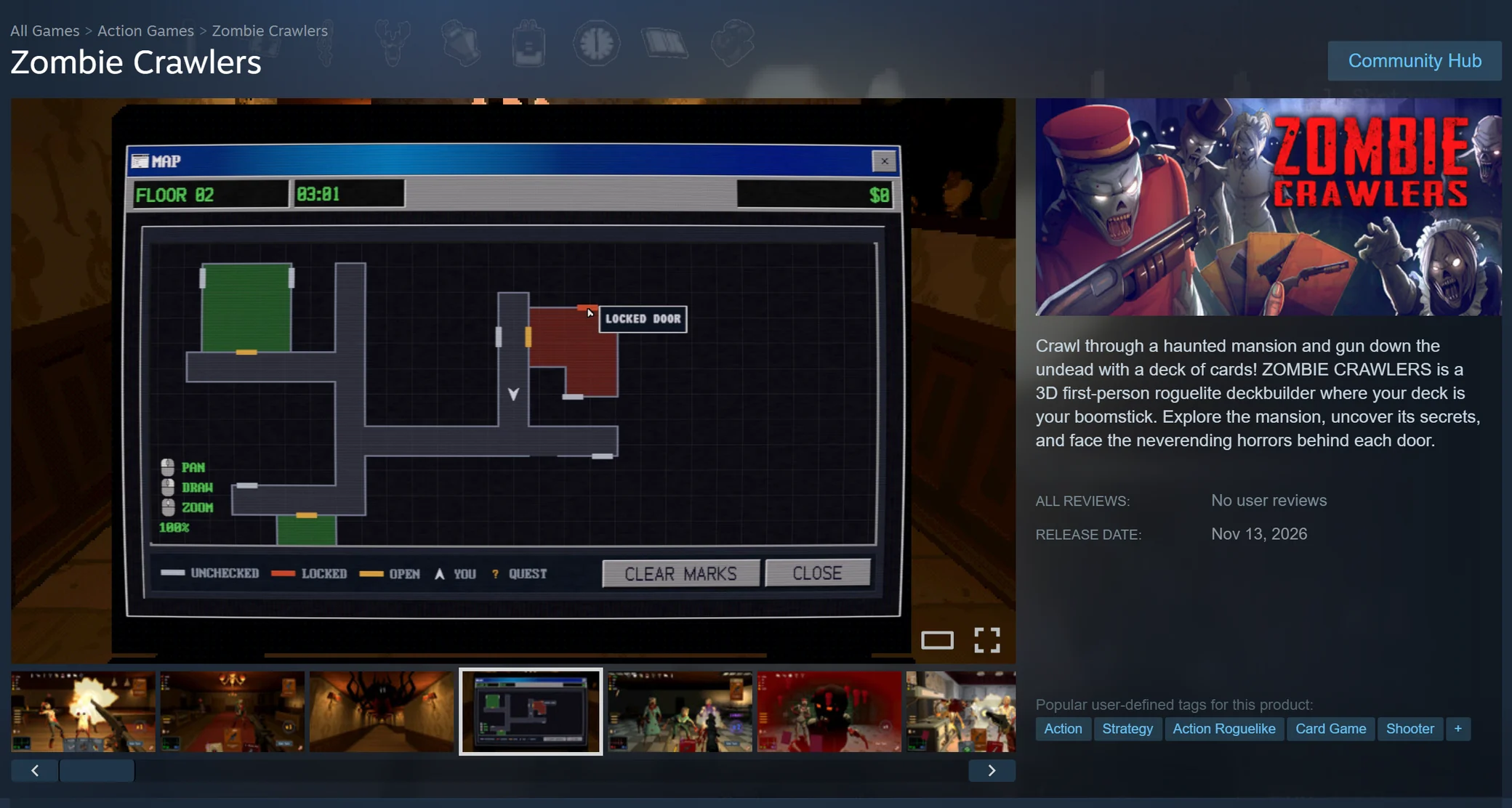
store.steampowered.com
The Steam store page for Zombie Crawlers: a screenshot of the game's map screen, styled like an old desktop window with rooms and a locked door marked, beside the game's cover art, a short description, and a release date of Nov 13, 2026.
Zombie Crawlers on the Steam store, with a playtest open to players and release set for November 13, 2026. See it on Steam.

How it's built

  • A two-person team and a large codebase.

    I co-develop Zombie Crawlers with one other developer. It is a Unity 6 game written in C#, with more than 1,600 automated tests, and it releases on Steam on November 13, 2026.

  • What I led.

    The UI framework and theming, the save and progression system, the minigames, and editor tools such as a decal painter.

  • CLI and MCP connect agents straight to the tools.

    Agents drive the open Unity editor through its command line (CLI), about 140 commands, so they place objects, run tests and take screenshots themselves instead of hand-editing files. Over MCP, the standard for plugging tools into AI agents, the code agent pulls designs straight from Claude Design.

Built with
  • Unity 6
  • C#
  • Unity CLI
  • Steamworks
  • Plastic SCM
  • Python
  • Claude Code
  • OpenAI Codex